
Choosing your ETH Clients
Rocket Pool's Smartnode installer can transform your machine into a full Ethereum node, as it requires both Execution and Consensus clients in order to operate properly.
The terms ETH1/ETH2 have been deprecated. The chains will be referred to as the Execution Layer (ETH1) and the Beacon Chain or Consensus Layer (ETH2) in the rest of these guides.
If you already have Execution and Consensus clients up and running on a separate machine (for example, if you're already solo-staking), then skip this section and move onto the Configuring a Hybrid Rocket Pool Node with External Clients section.
Otherwise, read on to learn more about your choices for Execution and Consensus clients.
As of August 2025, the distribution of clients on the Beacon Chain looks roughly like this:
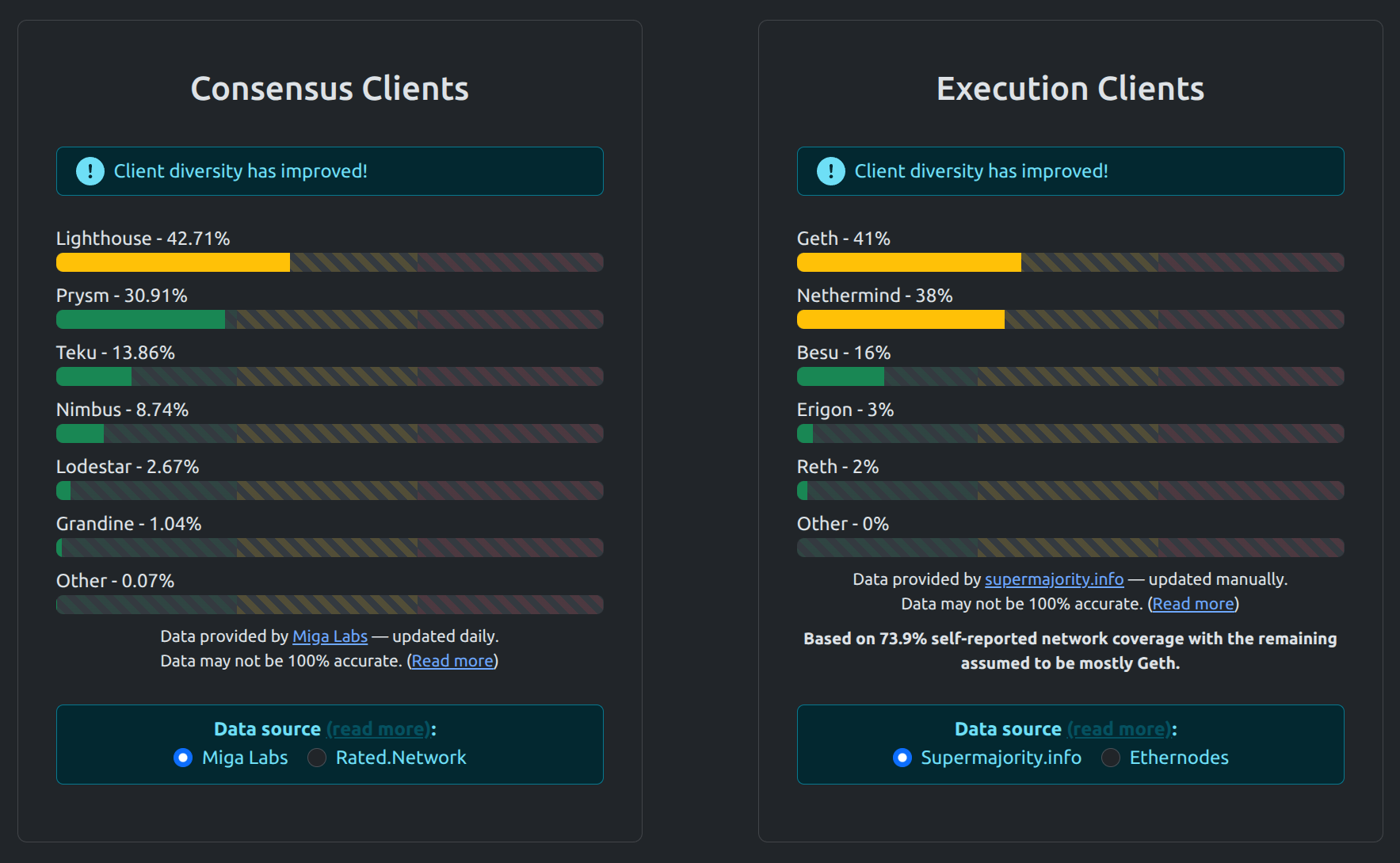
Data obtained from https://clientdiversity.org
Obtaining data on which consensus client a validator is running is a relatively difficult problem because clients are not easily identified. The data methodology page on https://clientdiversity.org goes into how data from different sources are obtained. Feel free to check out https://ethernodes.org/ as an additional source of data.
The overwhelming majority of node operators are currently using Geth as an Execution Client and either Lighthouse or Prysm as a Consensus Client. In the interest of supporting the health of the Execution Layer (formerly ETH1) and the Beacon Chain (formerly ETH2), we currently recommend that you consider using different clients. Here are some relevant articles about why an even client diversity is crucial to the health of the network if you would like to learn more:
https://clientdiversity.org/#why
https://blog.ethereum.org/2020/08/21/validated-why-client-diversity-matters/
https://our.status.im/the-importance-of-client-diversity/
https://medium.com/prysmatic-labs/eth2-mainnet-incident-retrospective-f0338814340c
https://dankradfeist.de/ethereum/2022/03/24/run-the-majority-client-at-your-own-peril.html
https://eth2book.info/bellatrix/part2/incentives/diversityFor users that would like to get up and running quickly, the Smartnode installer provides a Random Client option which may be the best choice.
For users that have a specific client they'd like to use in mind, we provide the ability to easily choose one during Rocket Pool's installation.
The options below help to describe each client so you can make an informed decision if you'd like to specify which one you want.
Execution Clients
Rocket Pool supports four different Execution clients: Geth, Besu, Nethermind, and Reth.
Running an Execution client involves storing a copy of the Execution layer blockchain on your machine. It interacts via peer-to-peer communications with other EC nodes to record and verify new blocks and transactions. A full Execution client is required to run a validator now that the Execution and Consensus layers have merged.
Geth
Geth (formally named Go Ethereum) is one of the three original implementations (along with C++ and Python) of the Ethereum protocol.
It is written in Go, fully open source and licensed under the GNU LGPL v3.
Geth is the oldest and most widely-used Execution Client around the world. It has a reputation for being very stable and reliable.
It is multithreaded, meaning it can take advantage of your entire CPU. Its RAM usage is configurable, down to a minimum of about 4 GB for Mainnet. This makes it viable for low-power systems and high-power systems alike.
Geth requires offline pruning of its database periodically: its database will grow over time and gradually consume all of your free disk space unless you prune it when your disk runs low on free space. The frequency you need to prune will depend on your SSD's size.
For more information on pruning Geth, view the Pruning the Execution Client page.
Besu
Hyperledger Besu is an open-source Ethereum client developed under the Apache 2.0 license and written in Java. Besu's most exciting features is its use of Bonsai Tries for state storage. In addition to their better performance characteristics, Bonsai Tries give Besu two interesting advantages over the other clients:
- Besu does not need to be pruned at all; it is effectively maintenance-free in that respect
- Besu is able to revisit any past block in the blockchain, though it does this by rewinding each block so reaching blocks from long ago may take some time.
Besu currently recommends at least 16 GB of RAM, though it is possible to run successfully with 8 GB.
Nethermind
Nethermind is written in .NET Core. It boasts the fastest sync speed of the Execution clients and has a rich set of configuration options. It is designed with node operators in mind and has many features that they will find helpful.
Like Geth, Nethermind requires periodic pruning of its database. Unlike Geth, however, Nethermind's database can be pruned while it stays online. This means you do not need to turn your client off and rely on a fallback in order to prune. However, Nethermind's online pruning process is quite resource intensive so users running low-power nodes may see some performance degradation during the process.
Nethermind requires at least 16GB of RAM, though more is preferable.
Nethermind requires periodic pruning of its database periodically: its database will grow over time and gradually consume all of your free disk space unless you prune it when your disk runs low on free space. The frequency you need to prune will depend on your SSD's size.
Unlike Geth, however, Nethermind remains online while it is pruning. This makes it a compelling choice for nodes because they won't have any down time during pruning.
For more information on pruning Nethermind, view the Pruning the Execution Client page.
Reth
Reth is an Execution layer client written in Rust and uses the Erigon staged-sync architecture. Reth is designed from the ground up with efficiency, performance, and modularity in mind. It's licenced under the Apache/MIT permissive license and built with small, well-abstracted, well-tested, and benchmarked packages. This makes for a great open source developer experience and allows Reth's components to be used in other projects.
As the newest client in the ecosystem, Reth is rapidly evolving and gaining adoption. While RAM and CPU requirements are flexible, the most important requirement is by far the disk. We suggest using a good TLC disk. Reth requires at least 8 GB of RAM for a full node or 16 GB of RAM for an archive node.
Client Comparison Table
| Client | Type | CPU Usage | Minimum RAM Usage | Sync Time |
|---|---|---|---|---|
| Geth | Full | Moderate | 4 GB | Moderate |
| Besu | Full | Moderate | 6 GB | Slow |
| Nethermind | Full | Moderate | 16 GB | Fast |
| Reth | Full | Moderate | 8 GB | Fast |
Consensus Clients
Rocket Pool's installer is proud to support five currently available Consensus clients: Lighthouse, Lodestar, Nimbus, Prysm, and Teku.
Each of these is a full client, meaning you will contribute to the decentralization of the Consensus network regardless of which client you choose.
All five clients are quite low-risk, low-maintenance, and will generate practically identical total rewards from validation. They differ slightly in terms of resource requirements and features, but you cannot go wrong with any of them.
By default, the Rocket Pool installer will offer to select a random consensus client for you. This will help contribute to the overall diversity of the network. This is important from a security perspective: if one client is used by a majority of nodes and suffers from a severe bug or attack, it might cause all of those nodes to fail and thus threaten the entire Beacon Chain's stability.
Lighthouse
Lighthouse is an open-source Ethereum 2.0 maintained by Sigma Prime. It implements the Ethereum 2.0 specification as defined by the Ethereum Foundation Research team.
Lighthouse is a cutting-edge distributed systems project implementing technologies at the forefront of blockchain research; including proof-of-stake consensus, parallel transaction execution and state separation (sharding).
Lighthouse has no official affiliation with the Ethereum Foundation and will continue to follow its guidance as long it is remains in the best interest of the Ethereum protocol and community surrounding it.
Lighthouse is implemented in Rust and will maintain a focus on security and efficiency.
Lodestar
Lodestar is the fifth open-source Ethereum consensus client maintained by ChainSafe Systems. Our flagship product is our production-capable beacon chain and validator client for Ethereum consensus. Our software and tooling is uniquely situated as the go-to for researchers and developers for rapid prototyping and browser usage. Millions of developers around the world are familiar with Typescript, and Lodestar's high-quality codebases are excellent introductions to the Ethereum world.
Lodestar has also been a leader in light client research, standardization, and implementation of Ethereum light clients. We strive to work with other client implementers, researchers and developers to demonstrate the importance of having browsers utilize trustless data directly from the blockchain.
Lodestar's niche is in its implementation language, Typescript.
Nimbus
Nimbus is a client implementation for both Ethereum 2.0 and Ethereum 1.0 that strives to be as lightweight as possible in terms of resources used. This allows it to perform well on embedded systems and resource-restricted devices.
However, resource-restricted hardware is not the only thing Nimbus is good for. Its low resource consumption makes it easy to run Nimbus together with other workloads on your server (this is especially valuable for stakers looking to lower the cost of their server instances).
Nimbus is written in Nim and maintained by the Status.im team.
Prysm
The Prysm project is a full-featured implementation for the Ethereum 2.0 network written entirely in the Go programming language.
Created by Prysmatic Labs, Prysm implements the official Ethereum 2.0 specification, which is the product of an ongoing collective research and development effort by various teams across the Ethereum ecosystem including the Ethereum Foundation.
Teku
Teku (formerly known as Artemis) is a Java-based Ethereum consensus client designed & built to meet institutional needs and security requirements. PegaSys is an arm of ConsenSys dedicated to building enterprise-ready clients and tools for interacting with the core Ethereum platform.
Teku is Apache 2.0 licensed and written in Java, a language notable for its maturity & ubiquity.
Client Comparison Table
| Client | CPU Usage | Minimum RAM Usage | Sync Time |
|---|---|---|---|
| Lighthouse | Moderate | 2 GB | Instant with checkpoint sync |
| Lodestar | Moderate | 4 GB | Instant with checkpoint sync |
| Nimbus | Low | 0.75 GB | Instant with checkpoint sync |
| Prysm | Moderate | 2 GB | Instant with checkpoint sync |
| Teku | Moderate | 4 GB | Instant with checkpoint sync |