
Shut Down a Minipool
Exiting your Validator
When you have decided that you no longer want to run a minipool and want to access the full balance locked on the Beacon Chain, you will have to take several steps:
- Send a voluntary exit request for the minipool's validator from the Beacon Chain.
- Wait for your validator to exit.
- Wait for your validator's balance to be withdrawn to your minipool on the Execution layer.
- Close the minipool to distribute the rewards and access the funds
We'll cover each step below.
Sending the Exit Request
If you want to exit the validator attached to a minipool, run the following command:
You will be presented with a list of minipools that can be exited:
Once you confirm you want to exit, your node will send a voluntary exit request to the Beacon Chain. This is not a normal Execution layer transaction, so you do not need to pay gas for it.
If you need the validator public key for the minipool you just exited, you can retrieve it using rocketpool minipool status.
You can view your validator's exit status on a Beacon Chain explorer such as https://beaconcha.in (or https://hoodi.beaconcha.in for the Hoodi Testnet).
It will take some time for your status to be updated, but once it is you will see it in the "exiting" state:
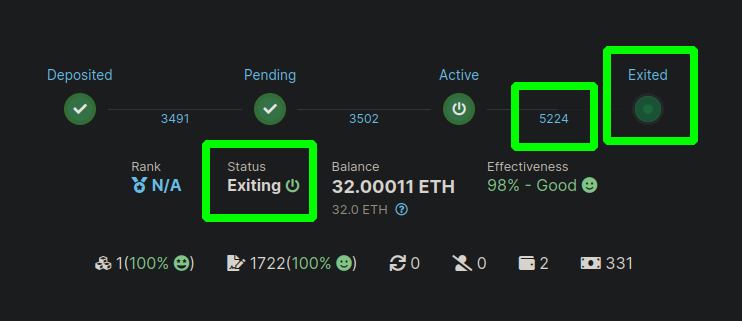
Here you can see the Status is Exiting, the epoch it will exit on is highlighted (5224), and the "Exited" icon will be pulsing green to indicate the operation is in progress.
It may take some time for your validator to exit, especially if there are a large number of validators exiting the Beacon Chain at the same time; the protocol is designed to only allow a small number of validators to exit per epoch so you may have to wait your turn.
Once your exit epoch has passed, your validator will officially exit the chain and will no longer attest or propose blocks. You can confirm this in your Validator Client logs, or on the explorer:
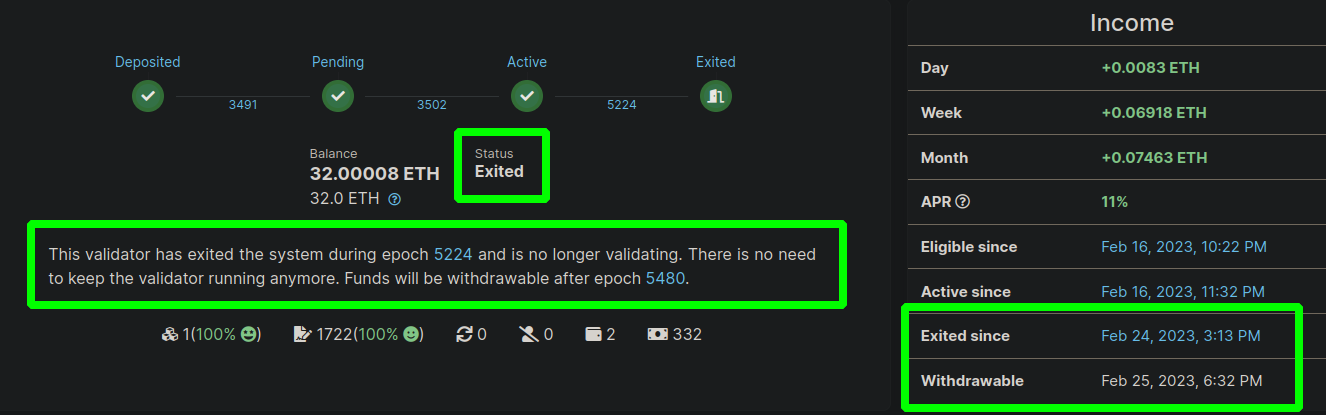
The status has changed to Exited and there is some text underneath that indicates your withdrawable epoch (which should be 256 epochs after you exit, or about 27 hours).
Beaconcha.in also conveniently provides the local timestamps for when your validator will exit and when it will be withdrawable.
Once it has entered the withdrawable state, your validator will be enqueued by the Beacon Chain for rewards distribution. This queue depends on how many validators are currently withdrawing. Once it's your turn, the Beacon Chain will automatically send your balance to your minipool's address on the Execution layer. At this point, you can access it using the Smartnode CLI to do a distribution.
Distributing Full Rewards
This process requires your validator to be exited from the Beacon Chain and your validator's balance to have been transferred to the minipool contract. If you need a refresher on how to do that process, please see the Exiting your Validator section above - return here once you're done.
If you have exited your validator from the Beacon Chain and your balance has been deposited into the minipool contract, you can safely withdraw the entire thing in one command. Unlike manual distribution, this process will actually finalize your minipool which closes it and renders it inactive. Once your balance has been withdrawn from the Beacon Chain and you go through the following process to access the funds, the minipool's duty is over.
To retrieve the funds and close the minipool, run the following command:
This will present you with a list of minipools that are eligible for closure:
Here you can see the total balance for each eligible minipool, how much of that balance will be distributed to you, and how much of that balance is reserved for you as a refund (which bypasses distribution).
Select which minipool you'd like to distribute and close from the list, confirm the action, and wait for your transaction to be validated.
Once it does, your share of the minipool balance (and your refund) will be sent to your withdrawal address, and the minipool will enter the finalized state.
You can verify it by looking at the transaction on a block explorer; for example, see the transaction for closing the above minipool (Goerli Testnet).
Unstaking RPL
At this point, your effective RPL will be updated to remove this minipool from the calculation. You can now unstake any RPL you have that would put you over the 60% bonded ETH threshold.
To unstake RPL against the node, run the following command:
There are two limitations on RPL withdrawals:
RPL cannot be withdrawn within 28 days of staking (or restaking) RPL. Be careful if you claim these rewards before closing your minipool, if you restake any amount of RPL rewards you will not be able to withdraw any amount of RPL for 28 days since the last staking action.
RPL can be withdrawn down to 60% of your total bonded ETH. On a full exit, that means all of it can be withdrawn; for partial exits, plan with this limit in mind.
A Note on the Old Delegate
The original minipool delegate assigned to every minipool from Rocket Pool's launch until Atlas's deployment was built with two assumptions in mind:
- The only time your minipool will ever have a balance is after the validator has exited the Beacon Chain.
- The Oracle DAO will change your minipool's state from "staking" to "withdrawable" once the balance has been transferred from the Beacon Chain to the minipool contract.
The first point is clearly no longer relevant now that Ethereum is being upgraded to support skimming. The second point is also no longer true, because the Oracle DAO is no longer going to flag "withdrawable" minipools. This was an intentional design decision to reduce the power that the Oracle DAO yields over Rocket Pool node operators and allow them to access rewards without any supplemental requirement on trusted parties.
Because of these deficiencies, the Smartnode CLI no longer supports withdrawals or fund distribution on the original minipool delegate. If you'd like to access your rewards, you must upgrade to the Atlas delegate which supports the new withdrawal conditions listed above.
If you are an advanced user and bypass the CLI to invoke the distribution functionality on the contract directly via a third-party tool, be advised of the following things:
- The delegate's distribution function will revert if the minipool's balance is below 16 ETH. Balances below 16 ETH cannot be accessed.
- If the minipool has between 16 and 32 ETH in its balance, distribution by the original delegate will assume your validator has been slashed. It will return 16 ETH to the staking pool and give you whatever is left over. It will only function properly if the minipool balance is above 32 ETH.
- The minipool will never enter the
finalizedstate because the Oracle DAO will never mark it aswithdrawable, so even though you may be able to access your ETH, your RPL will be locked until you upgrade to the Atlas delegate.
Because of these points, we strongly recommend you just upgrade to the Atlas delegate in the first place and avoid them entirely.