
Migrating from the Test Network to Mainnet
If you've already used Rocket Pool on our Hoodi test network, are comfortable with its ins and out, and are ready to either stake ETH or run a node for real on the main Ethereum chain, then this guide is for you! Here you will find instructions on how to migrate an existing Smartnode stack from the Hoodi test network to one connected to the Ethereum mainnet, ready for staking your own real ETH and RPL.
Pool Staking on Mainnet
Pool staking is largely the same process on mainnet as it was on the testnet. The URL will be different and the address of the rETH token may be different, but there are no significant changes to the workflow. Follow the Staking Guide, which has been updated with instructions for mainnet.
Differences Between the Testnet and Mainnet
- The testnet Smartnode has a faucet for test ETH. The mainnet Smartnode does not have a faucet. You will need to supply your own ETH in order to stake.
- Mainnet supports many Ethereum wallets via WalletConnect, so you can use other wallets that you could not use on the testnet. You are no longer restricted to using Metamask in order to stake.
Smartnode Operation on Mainnet
Nothing from the test network can be migrated to mainnet. The chain data is different for both Execution and Consensus, so you must remove the old chain data and resync the mainnet chains from scratch. Your validators on the testnet do not carry over to mainnet. Also, for security, compatibility, and safety purposes, you must make a new wallet on mainnet! Do not use your testnet node wallet on mainnet!
The following steps will delete all of your testnet data. If you want to preserve your test network setup, you should back up your hard drive or move it to a second machine.
Differences Between the Testnet and Mainnet
- The testnet Smartnode has a faucet for ETH and RPL. The mainnet Smartnode does not have a faucet. You will need to supply your own ETH and your own RPL.
- If you are using Geth, your node's workload will be considerabily higher. Geth takes approximately 40x the storage space of Hoodi, and requires more CPU power and RAM to process. If you're using the Rocket Pool Grafana dashboard, be prepared to see much higher usage. A full Geth node uses 1.4 TB as of 2025-09-19. Expiring block data prior to the merge can reduce the storage usage by about 300-500 GB.
- Your Beacon Chain peers (and thus, your attestation effectiveness) will be higher than the testnet. Peers on mainnet are much more diverse and tend to be higher quality than on the testnet.
- The RPL rewards checkpoint occurs every 28 days instead of every 2 days, to help offset high gas costs.
- The RPL price used by the Rocket Pool network (and thus, your collateral level) along with the total effective staked RPL across the network are reported once every 24 hours instead of once every hour.
Automatic Migration (Docker Mode Only)
For Docker Mode users, the Smartnode can migrate to Mainnet for you automatically.
While you still have the testnet configured, exit your validators on Hoodi:
Select 1: All available minipools from the list of choices and wait for it to complete.
This will help clean up the network by removing your validators instead of leaving them to constantly fail attestations and weaken Hoodi's health (since they're no longer online).
Once that's done, open the Settings Manager:
Next, open the Smartnode and TX Fees category and change the Network drop down from Hoodi Testnet to Ethereum Mainnet:
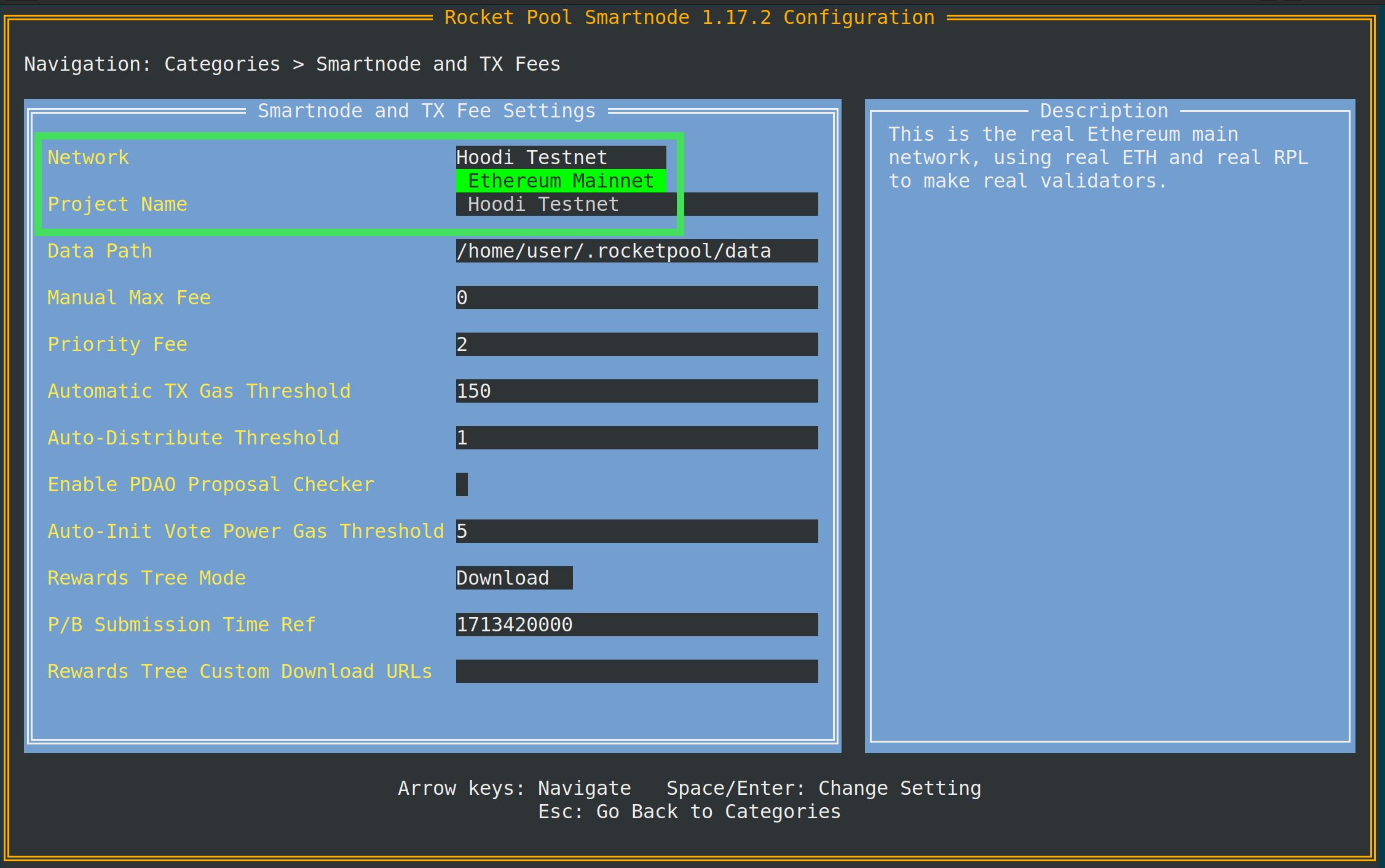
When you save and exit, you will be prompted with a notification that everything is about to be erased and a confirmation dialog:
Back up anything you want to keep (such as your data folder which contains your node wallet and validator keys), then press y and Enter when you're ready.
The Smartnode will handle switching over automatically.
When it's done, you will be left with a fresh install on Mainnet. All of your settings (such as client choice) will be preserved, but you will need to create a new wallet. Also, you likely will not have a Checkpoint Sync URL on mainnet and should set one up as explained here; otherwise it will take a long time to sync the mainnet beacon chain.
Migrating Manually
If for any reason you cannot leverage the Smartnode's automatic migration process, you can do it manually in a few simple steps:
- While you still have the testnet configured, exit your validators on Hoodi:
Select 1: All available minipools from the list of choices and wait for it to complete.
This will help clean up the network by removing your validators instead of leaving them to constantly fail attestations and weaken Hoodi's health (since they're no longer online).
- Shut down the testnet:
- Delete your testnet chain data and Docker containers:
- Delete your Rocket Pool configuration folder:
- (Optional) Delete your Rocket Pool CLI:
You will overwrite this with the latest version of the CLI anyway, but if you want to be thorough, you can remove the old one first.
At this point your testnet installation has been purged, and you can safely migrate to a new mainnet installation. Follow the Creating Node with Docker guide carefully to set it up.